How to Add Menu Dropdown
Setup Menu
Setting up Navigation Menus works normally as it does for any Blogger Theme. If you're new to Blogspot, you can learn more about menus in this article (external).
Creating a New Menu
- Go to Layout > Widget > Menu.
- Click icon

- Add A New Item :
- Site name > your text menu
- Site URL > your URL / Pages blog
- If you want to use this menu in a dropdown, in the "Text name" section, add the "_" sign, for example: _Dropdown Menu. Click Save.
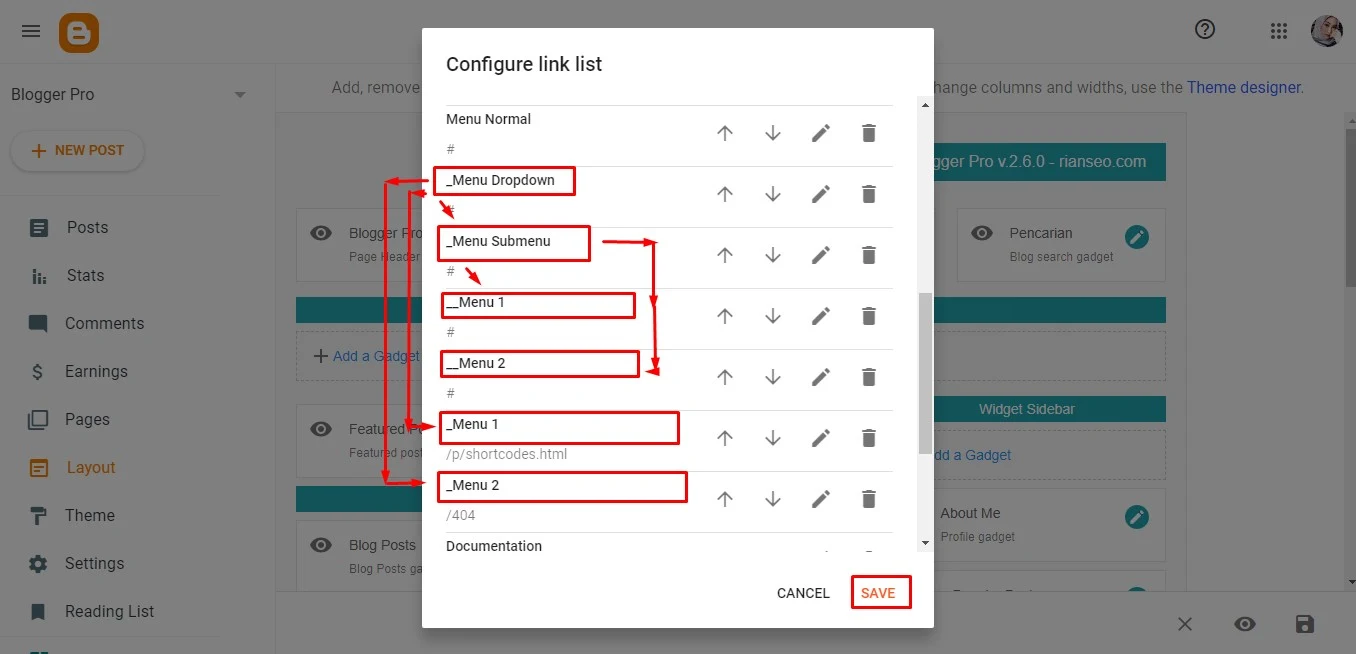
- SubLink Level 1 Example:
_Menu 1Before the Title add 1 underscore - SubLink Level 2 Example:
__Menu 2Before the Title add 2 underscore
- SubLink Level 1 Example:
- Click Save Menu and that is all.